Why LifeMaxing has the best calorie tracker

The best calorie tracker is accurate enough to trust, detailed enough to help you choose the next meal, and fast enough that you still use it on a busy day. LifeMaxing is built for all three.
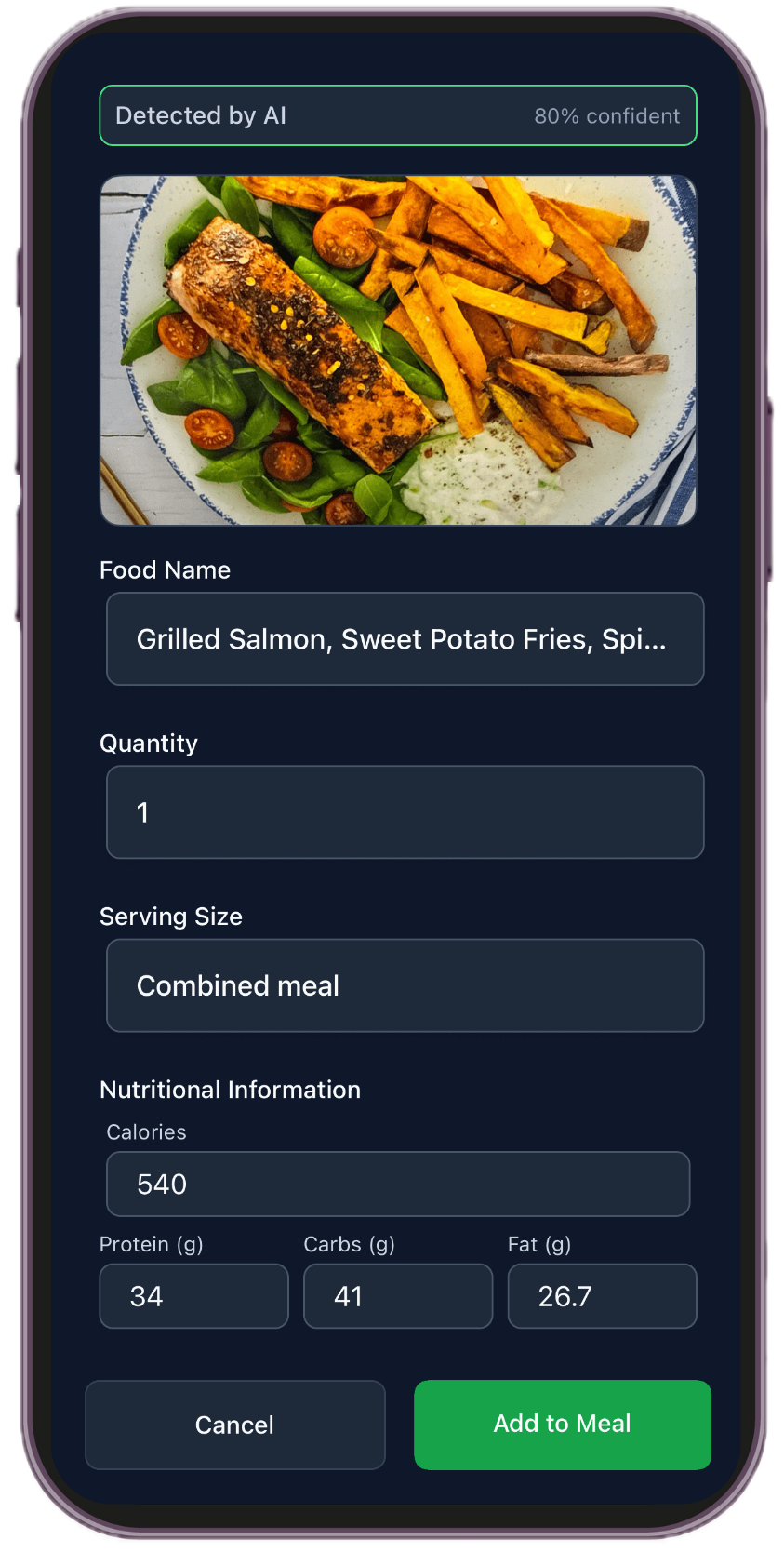
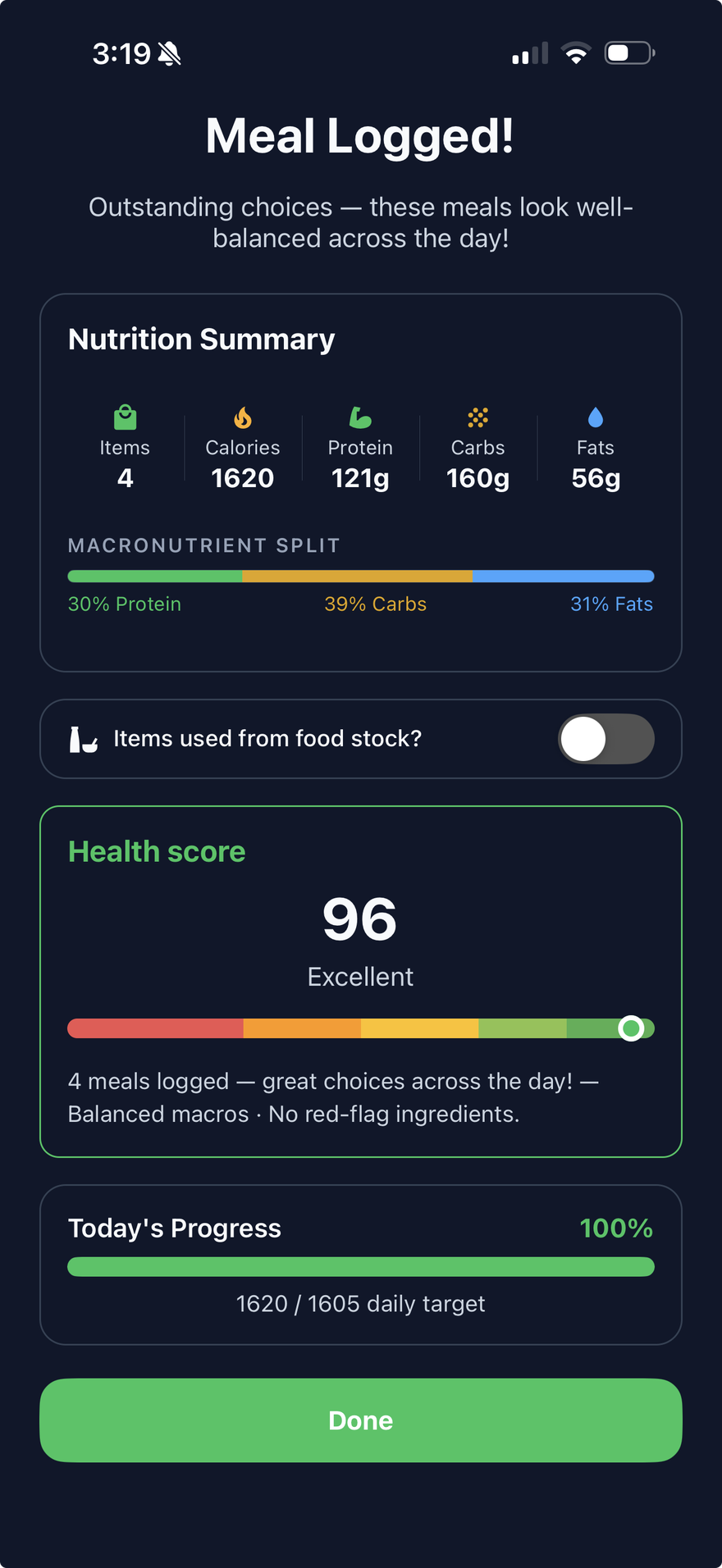
Photo estimates are not lab measurements. A health score is a guide for the next meal, not a diagnosis. If you have a medical condition or a prescribed diet, follow your clinician’s guidance.
What people mean by the best calorie tracker
Search “best calorie tracker,” “best calorie tracker app,” or “best calorie counting app,” and the results are a pile of food diaries, AI photo scanners, and meal-plan programs. They are not the same product. A calorie tracker earns the word “best” when it does three jobs at once.
- The number is close to what you ate. A fast guess that is quietly low all week will not help you.
- The meal tells you something useful. Calories and macros are the size of the meal. You also want to know whether it was a meal you should repeat.
- Logging fits a real day. If every meal takes a search, the diary dies by Thursday.
LifeMaxing’s calorie tracker app is built around those three jobs: a photo you can correct, a health score on the meal, and four ways to log, including a meal plan you can confirm from a notification. The rest of this guide walks through each one, then puts the other calorie apps next to it so you can see which tool matches which job.
The calorie tracker apps people compare
These are the names that show up when someone is choosing a calorie counter, a macro tracker, or an AI calorie tracker. Each one is good at a specific job.
- MyFitnessPal is the default food diary. It has a huge database, barcode scanning, and search. People stay for packaged foods and familiar meals.
- Lose It! is a calorie-budget diary with barcode scanning and a photo snap. It is the other app people try when they want a simpler MyFitnessPal.
- FatSecret is a free calorie counter with a large community food list.
- MyNetDiary is a detailed food diary with reports, built for people who like a thorough log.
- Cronometer is the micronutrient logger. If the question is vitamins and minerals from verified foods, this is the specialist.
- MacroFactor adjusts your calorie and macro targets from what you log and how your weight moves. The coach is the product.
- Cal AI popularized snapping one photo and getting a calorie estimate. It is a photo calorie tracker, and that is the job.
- SnapCalorie is another photo calorie app, focused on estimating the portion from the picture.
- Foodvisor is a photo food diary. You snap the plate, it returns the meal.
- Yazio combines a calorie counter with meal plans and fasting.
- Lifesum is a meal-plan app with calorie and macro tracking.
- Noom is a coaching program wrapped around a food log, with a color system for foods.
- Carb Manager is the calorie tracker people pick for low-carb and keto.
LifeMaxing belongs in that list as a calorie tracker you can correct, judge, and log in more than one way. It also sits next to workouts, habits, and sleep, so the food log is part of the day. If you only want one specialist job, the list above still has a clear pick. The sections below are why the combination is stronger for most people who want an accurate calorie tracker they will still open next week.
Every photo calorie tracker has an accuracy problem
Cal AI, SnapCalorie, Foodvisor, Lose It!’s photo snap, and the photo flow in LifeMaxing all start the same way. The app looks at a picture, guesses the foods and the portions, and returns calories and macros. That first number is an estimate from a flat image.
A flat image has two blind spots.
Height. A top-down photo shows what is on the plate. It does not show how tall it is. A bowl of rice can look like a thin layer and be two cups deep. A burger can look like a circle and be mostly bun, cheese, and sauce stacked up. Portion size is the main reason a photo calorie estimate drifts.
Hidden food. The camera cannot see oil in the pan, butter on the toast, dressing on the salad, mayonnaise under the bread, cream in the coffee, or the soda sitting just outside the frame. Those are often the calories that change the day. A scan that only names the chicken and the lettuce will come in low.
Lighting, mixed plates, and a half-eaten meal make the guess worse. None of this is unique to one app. It is how a photo works. An accurate calorie tracker has to let you fix the guess before it becomes the log.
LifeMaxing lets you add a side-angle photo
Take the usual photo from above, then take a second photo from the side. The side angle shows the height the first photo hid: a deep bowl, a tall stack of pancakes, a sandwich that is thicker than it looked. The scan has a real portion to work from, so the calorie estimate starts closer to the plate.
Shoot both photos before the first bite, in enough light to see the foods as separate items. A fork, the rim of the bowl, or the edge of the plate gives the picture a sense of scale. For the rest of the shooting tips, see how to track calories from photos.
Then add the ingredients the photo missed
After the scan, LifeMaxing lets you add hidden and missed ingredients. This is the step that closes the second blind spot.
- Cooking oil, butter, and ghee
- Sauces, dressings, mayo, and cheese that sat under something else
- Sugar, milk, or cream in coffee and tea
- Drinks that were not in the frame
- A second helping you added after the photo
- Food the scan invented, which you can remove
- The part of the plate you did not finish
The saved meal is the photo plus your corrections. Treat the first result as a draft. Confirm the foods, add what the camera could not see, then save. That is how the log stays useful across a week.
Use the photo for cooked meals and restaurants. For a protein bar, a yogurt, or anything with a label, scan the barcode. A label is a better source than a picture of a wrapper. If you already know the food by name, type it. The calorie tracker keeps all three in the same day.
Calories and macros, plus a health score
Most calorie counting apps stop at four numbers: calories, protein, carbs, and fat. Those numbers tell you the size of the meal. They do not tell you whether lunch was grilled chicken, rice, and vegetables, or a fried sandwich and a sweet drink that landed on a similar calorie total.
LifeMaxing shows the calories and macros, and it also shows a health score for the meal. Next to the score, it lists the ingredients it treats as helpful and the ingredients that pull the meal down. You can see what is doing the work, in plain language, without building a spreadsheet.
Use it as a decision, not a verdict. Two dinners can have close calories. The score and the ingredient list show which one you would rather eat again tomorrow. If the score drops because of one sauce, keep the meal and change the sauce next time. You do not have to throw out the plate.
“Healthy” and “unhealthy” here mean how the app reads that ingredient in this meal — often vegetables, lean protein, and fiber on one side, and added sugar, deep-fried coating, or a heavy sauce on the other. It is not a medical label, and it is not a reason to fear a single food. Cronometer is still the better tool if your only question is vitamins and minerals. LifeMaxing answers the everyday question: how big was this meal, and is it one to repeat?
Four ways to track calories, including from a notification
People quit food diaries because logging becomes a second job. MyFitnessPal, Lose It, FatSecret, and MyNetDiary are excellent once you are already in the search box. Yazio, Lifesum, and Noom give you a plan or a program, and you still have to record the meal. LifeMaxing lets you track calories four ways, and you pick the one that matches the food in front of you.
- Log the meal plan with a tap. Set up a meal plan for the week — the breakfast you repeat, the lunch you pack, the dinner you already decided. When you eat what you planned, log it from the plan. There is no new search and no new photo. When the reminder fires, the notification includes an action button, so you can log that planned meal without opening the app.
- Scan a photo. Use this for a meal you did not plan: home cooking, a restaurant plate, a mixed bowl. Add the side-angle photo, add anything the camera missed, and save.
- Scan a barcode. Packaged food is a label problem. The barcode reads the package. That is the right tool for bars, drinks, yogurt, and anything with a nutrition panel.
- Type the meal. If you know the name — oats with milk, a chicken burrito, last night’s leftovers — typing is enough. It is also the fastest way to log a meal you eat often.
A normal Tuesday can use all four. Breakfast is on the plan, so you tap the notification and it is logged. Lunch is a restaurant bowl, so you take a top photo and a side photo, then add the dressing. The afternoon yogurt gets a barcode. Dinner is the same recipe as last week, so you type it. The day has one calorie total. You did not spend it inside a search box.
The plan is what makes the first method possible. A photo with no target is a gallery. A target with no easy way to log the planned meal is a document you ignore. LifeMaxing ties the log to workout and diet plans. If you are setting the week up, start with how to meal plan for the week. If you want the log to stay calm, read how to log calories without obsessing.
How LifeMaxing compares with other calorie trackers
Here is the same list, in one place, by the job each app is known for. LifeMaxing is the row that covers corrected photo logging, a health score, and a meal plan you can log from a notification.
| Calorie tracker | What it is known for | Best when you want |
|---|---|---|
| LifeMaxing | Side-angle photo, missed ingredients, health score, and four ways to log, including a meal-plan notification | An accurate calorie tracker you will still use, next to training and sleep |
| MyFitnessPal | Very large food database, barcode, and search | The biggest packaged-food diary |
| Lose It! | Calorie budget, barcode, and photo snap | A simpler classic food diary |
| FatSecret | Free calorie counter and community foods | A free database diary |
| MyNetDiary | Detailed food diary and reports | A thorough typed log |
| Cronometer | Micronutrients from verified foods | Vitamins and minerals |
| MacroFactor | Macro targets that adjust from your log and weight trend | A coach that moves your calorie target |
| Cal AI | Fast photo calorie estimates | A photo and nothing else |
| SnapCalorie | Photo-based portion estimates | A picture-only calorie guess |
| Foodvisor | Photo food diary | Snapping plates as the whole product |
| Yazio | Calorie counting with meal plans and fasting | A plan plus a fasting timer |
| Lifesum | Meal plans with calorie and macro tracking | A meal plan as the main product |
| Noom | Coaching program and a food color system | A course built around logging |
| Carb Manager | Low-carb and keto calorie tracking | A keto or low-carb diet |
Side-by-side writeups for the two comparisons people ask about most: LifeMaxing vs MyFitnessPal and LifeMaxing vs Cal AI.
A day in the LifeMaxing calorie tracker
Accuracy, detail, and speed show up together once the week has a plan.
- Breakfast is planned. The notification arrives. You tap the action and the meal is logged. The app stays closed.
- Lunch is new. You take a top photo and a side photo of the bowl, add the olive oil and the drink, and save. Calories, macros, the health score, and the ingredient list are on the meal.
- The snack has a label. Barcode. Done.
- Dinner is a repeat. You type it, or you tap it if it was already on the plan.
Check the day, not a single photo. One restaurant meal and one skipped breakfast can look like they cancel. The week is the number that matters. Logging stays free. Pro is $4.99 a month when you want the wider system around the log.
When a different calorie tracker is the right tool
LifeMaxing is the best calorie tracker when you want the estimate corrected, the meal explained, and logging that survives a normal week. Pick a specialist when your question is narrower.
- You live in packaged foods and want the largest search box: MyFitnessPal or Lose It!
- You want that diary free, with a community database: FatSecret
- You want long reports from a typed log: MyNetDiary
- You want vitamins and minerals: Cronometer
- You want an algorithm to move your calorie target: MacroFactor
- You want one photo and no other tools: Cal AI, SnapCalorie, or Foodvisor
- You want a fasting timer with the plan: Yazio
- You want the meal plan to be the whole app: Lifesum
- You want a coached program: Noom
- You are tracking keto or low-carb as the whole goal: Carb Manager
If the calorie log should also sit next to training, sleep, and habits, stay with LifeMaxing. The food diary apps stop at food. The photo apps stop at the picture. A plan you can log in one tap, a photo you can correct, and a health score on the meal are the difference.
Frequently asked questions
What is the best calorie tracker app?
The best calorie tracker is the one that stays close to what you ate, shows more than a calorie total, and is fast enough to use every day. LifeMaxing does that with a side-angle photo, a way to add missed ingredients, a health score on the meal, and four ways to log: from the meal plan, a photo, a barcode, or by typing.
Why are photo calorie trackers inaccurate?
A single photo is flat. It hides how tall the portion is, and it cannot see oil, butter, sauce, cheese inside a burger, or a drink sitting beside the plate. Cal AI, SnapCalorie, Foodvisor, and every other photo calorie app start from that same limit. LifeMaxing lets you add a side-angle photo and then add the ingredients the camera missed before you save.
Does LifeMaxing show more than calories and macros?
Yes. Each logged meal shows calories and macros, plus a health score and which ingredients are helpful and which ones pull the meal down. That is a guide for the next meal, not a medical diagnosis.
Can I log a meal in LifeMaxing without opening the app?
Yes, when the meal is already on your plan. Set up the meal plan, and the reminder notification includes an action button. Tap it to log that planned meal without opening the app. For a meal you did not plan, use a photo, a barcode, or type it in.
Is LifeMaxing a MyFitnessPal alternative?
LifeMaxing is a strong alternative if you want photo logging you can correct, a meal plan you can tap to log, and food next to workouts and sleep. MyFitnessPal is still the pick if your only need is the largest packaged-food database. Lose It, FatSecret, and MyNetDiary are the same kind of food diary. Cronometer is the pick for vitamins. MacroFactor is the pick for an adjusting calorie target. Cal AI is the pick if you want a photo and nothing else.
Put the guide into a daily system
LifeMaxing tracks habits, workouts, meals, sleep, and focus in one app. Start free.
Get the app