A calorie tracker app that logs a meal from a photo
Snap the plate, scan a barcode, or type the food. Correct what the picture missed, then keep calories and macros on the same diet plan as your workouts.
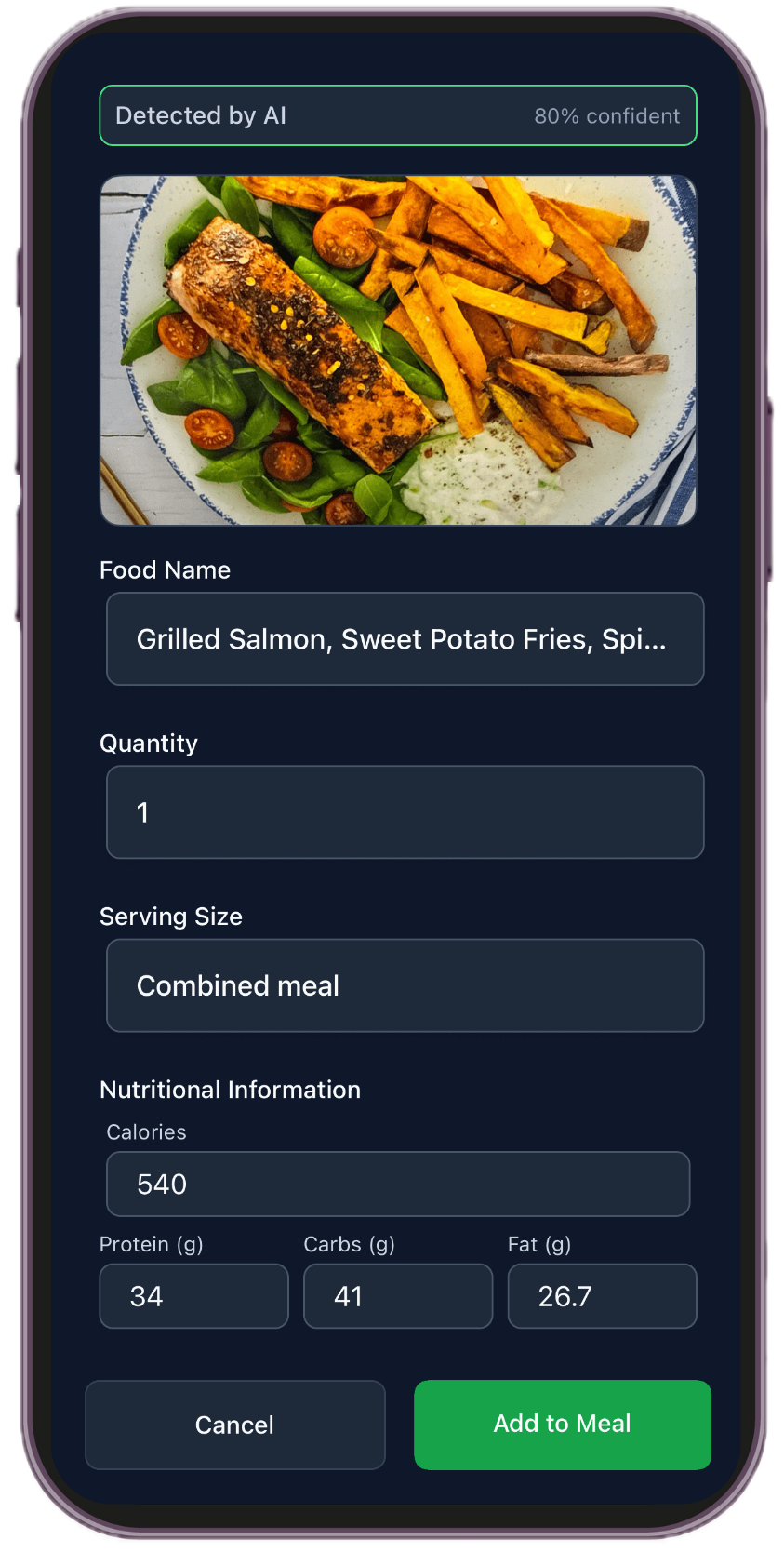
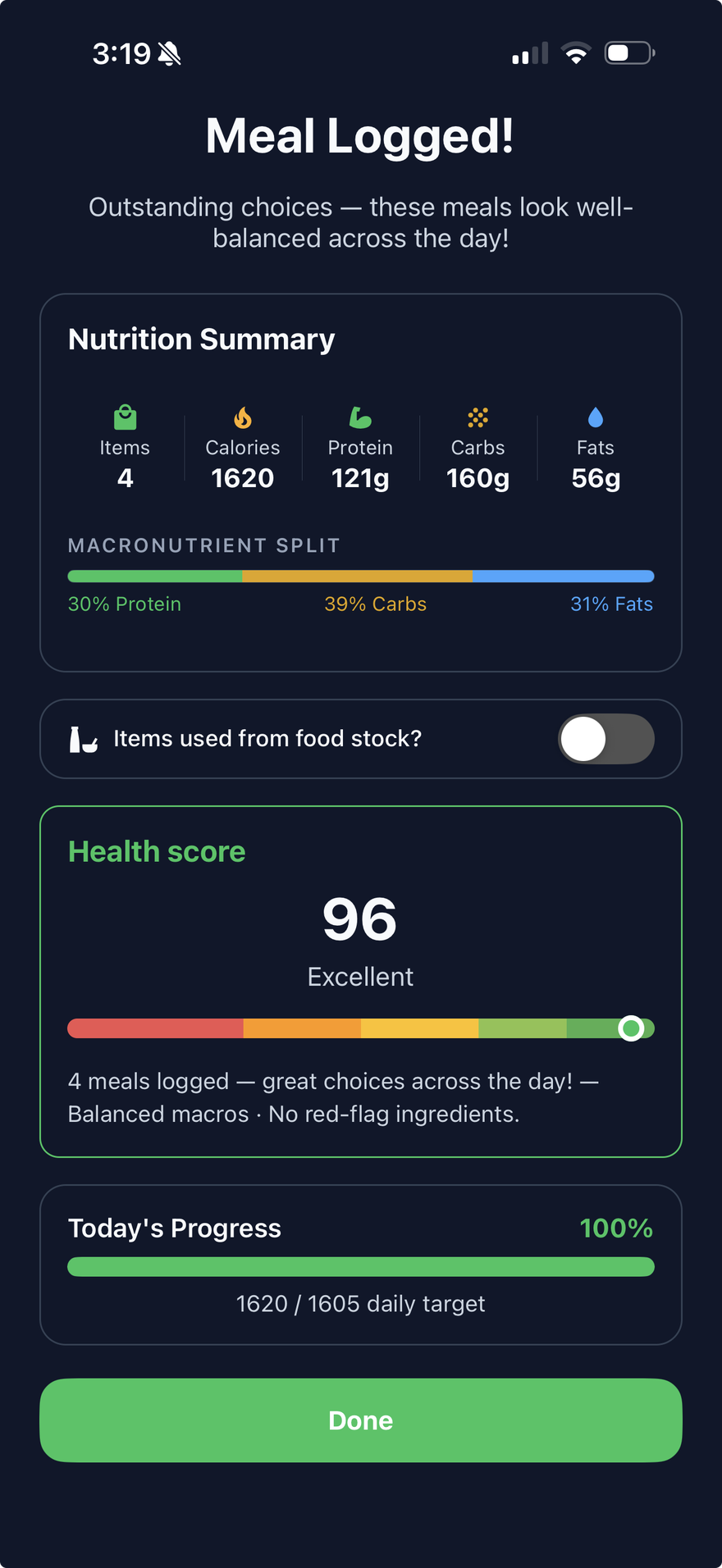
A calorie tracker app has one job before any of the extras: get a meal into the log without turning dinner into a search project. LifeMaxing does that four ways. Photograph the plate, scan a barcode, type the food, or confirm a meal you already planned. The day then shows calories, macros, and whether you are on the diet plan.
Photo estimates are not lab measurements. A health score is a guide for the next meal, not a diagnosis. If you have a medical condition or a prescribed diet, follow your clinician.
- Photo, barcode, or type Log calories the fast way, then see the day: meals, macros, and whether you are on track.
- A plan you can cook Diet plans, recipes, a grocery list, and pantry tracking — not only a running calorie total.
- Meals next to training Food sits beside workouts and sleep so a deficit or surplus is part of the same week.
What people want from a calorie tracker app
Search “calorie tracker app” or “app for calorie tracking” and the results mix three different products. A food diary searches a database. A photo app guesses the plate. A meal-plan app tells you what to eat and still asks you to record it. People bounce between them because each one fails a different day.
Packaged food wants a barcode. A restaurant plate wants a photo you can correct. A breakfast you eat every morning wants a plan you can confirm, not a new search. LifeMaxing keeps those logs in one day, next to the diet plan that says what the day was supposed to be.
The long version of the comparison, including MyFitnessPal, Lose It, Cronometer, MacroFactor, and Cal AI, is in why LifeMaxing has the best calorie tracker. This page is the product: how the calorie tracker app works, and when to use each log.
Four ways to log a meal
- Confirm the meal plan. Set the breakfast you repeat, the lunch you pack, and the dinner you already decided. When you eat what you planned, log it from the plan. A reminder can include an action so you record that meal without opening a search box.
- Scan a photo. Use this for cooked food and restaurants. Take the picture before the first bite, in enough light to see the foods as separate items.
- Scan a barcode. A label is a better source than a picture of a wrapper. Use it for a protein bar, yogurt, or anything with a nutrition panel.
- Type the food. When you already know the name and the amount, type it. The same day holds the photo, the barcode, and the typed entry.
Most calorie counting apps are excellent once you are already in the search box. The plan and the photo are there for the meals you will not stop to search.
Track calories from a photo, then fix the guess
A single overhead photo has two blind spots. It shows what is on the plate and hides how tall the portion is. A bowl of rice can look like a thin layer and be two cups deep. It also cannot see oil in the pan, butter on the toast, dressing, mayonnaise, cream in the coffee, or the drink sitting outside the frame.
Add a side-angle photo
Take the usual photo from above, then a second photo from the side. The side angle shows the height the first photo hid: a deep bowl, a tall stack, a sandwich that is thicker than it looked. Shoot both before the first bite. A fork, the rim of the bowl, or the edge of the plate gives the picture a sense of scale. Shooting tips are in how to track calories from photos.
Add what the camera missed
After the scan, add hidden ingredients and remove anything the scan invented. The saved meal is the photo plus your corrections.
- Cooking oil, butter, and ghee
- Sauces, dressings, mayo, and cheese that sat under something else
- Sugar, milk, or cream in coffee and tea
- Drinks that were not in the frame
- A second helping, or the part of the plate you did not finish
Treat the first result as a draft. Confirm the foods, add what the camera could not see, then save.
Calories, macros, and a health score
The log shows calories, protein, carbs, and fat. Those numbers are the size of the meal. LifeMaxing also shows a health score and lists ingredients it treats as helpful and ingredients that pull the meal down, so two dinners with similar calories are not the same decision.
Use the score as a choice for the next plate, not a verdict on this one. If the score drops because of one sauce, keep the meal and change the sauce next time. It is not a medical label. If your only question is vitamins and minerals from verified foods, a micronutrient logger is the specialist. This calorie tracker answers a plainer question: how big was this meal, and is it one to repeat?
A diet plan, not only a running total
A log with no target is a gallery. A target with no easy way to record the planned meal is a document you ignore. LifeMaxing ties the calorie log to workout and diet plans: recipes, a grocery list, and pantry tracking sit with the day’s calories. If you are setting the week up, start with how to meal plan for the week. If the log starts to feel loud, read how to log calories without obsessing.
The same food log is what a weight loss app uses for the deficit, and what a gym app uses so training and protein are in one week instead of two apps. If you do not have a target yet, start with the maintenance calorie calculator and split it in the macro calculator.
Free, and what Pro adds
Free: log meals by photo, barcode, or typing, and keep workouts, habits, and sleep in the same app. No credit card.
LifeMaxing Pro is $4.99 a month. It unlocks AI diet and workout plans tuned to your goal, unlimited AI credits, and the full libraries. Logging itself stays on the free plan.
Side-by-sides: LifeMaxing vs MyFitnessPal and LifeMaxing vs Cal AI.
Questions about the calorie tracker app
Is this calorie tracker app free?
Yes. You can log meals by photo, barcode, or typing on the free plan, with no credit card. LifeMaxing Pro is $4.99 a month and unlocks AI diet and workout plans, unlimited AI credits, and the full libraries.
Can I track calories from a photo?
Yes. Take a photo from above, then a second photo from the side so the portion has height. After the scan, add ingredients the picture missed, such as oil, sauce, or a drink, and remove anything the scan invented.
Does the calorie tracker scan barcodes?
Yes. Packaged food is better logged from the label. Scan the barcode for a protein bar, yogurt, or anything with a nutrition panel, and use the photo for cooked meals and restaurants.
How is this different from MyFitnessPal?
MyFitnessPal is a food diary with a large database. LifeMaxing logs calories from a photo, a barcode, typing, or a meal plan you confirm from a notification, then shows a health score and keeps that log next to workouts, sleep, and habits.
Is a photo calorie estimate exact?
No. A photo is an estimate, not a lab measurement. The side-angle photo and the ingredients you add are there so the saved meal is closer to what you ate. If you have a prescribed diet, follow your clinician.
Does the calorie tracker app work on iPhone and Android?
Yes. LifeMaxing is on the App Store and Google Play.